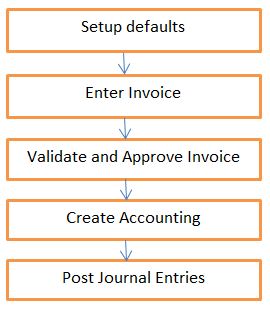
Overview Of payable :
1. Supplier / Creditor Master Creation :
Please refer my earlier post :
http://oracleapps99.blogspot.com/2011/08/r12-supplier-creation-part-1.html
http://oracleapps99.blogspot.com/2011/08/r12-supplier-creation-part-2.html
2. Invoice Creation :
2.1 Setup Defaults:
- Define defaults to speed up data entry.
- Defaults can be overridden at Invoice level if required.
- for Ex : define payment terms, to auto-assign multiple payment schedules and discounts when we enter the invoice using this payment term.
- Define paygroup, to o classify each invoice - Pick one Pay Group and pay all related invoices at one shot.
- Define Distribution Sets, to auto-create multiple invoice lines with pro-rata amounts when we enter the invoice
refer my earlier post for setups :
http://oracleapps99.blogspot.com/2012/03/r12-ap-payment-setups.html
http://oracleapps99.blogspot.com/2012/03/r12-ap-invoice-setup-1.html
2.2. Enter Invoice :
We can enter 9 types of invoice by using invoice entry form.
Type Of Invoices :
Standard
Credit Memo
Debit Memo
Expense Report
Prepayments
Retainage Release
Transportaion Invoice
Withhold Tax
Mixed.
Create Standard Invoice.
Invoices --> Entry --> Invoices
Enter Invoice Header details, like
Operating Unit, Type, Supplier / Trading partner name, Supplier name, Invoice amount Etc.
Click on
2 Lines Tab and enter line details like amount and save.
Click on
Distributions Button --> save
come back to like and click on line --. System will calculate the tax based on your tax setup.
Click on
All Distributions Button to see the complete distribition information.
2.3 Validate Invoice :
Actions --> Validate --> select Validate check box --> Ok.
and also we can see the reason from
Holds Tab. we can see all the holds and hold releases information for the invoice.
correct the invoice amount and validate the invoice --> Actions --> Validate --> select Validate check box --> Ok.
Click on View Payments Tab to see the all the payments for the invoice.
Click
Scheduled payments Tab to see all scheduled payments. In our example, we created invoice on 04-Apr-2012 and Invoice Due date / Payment dare also 04-Apr-2012. System will calculate the invoice due date based on payment terms and in our case we used payment terms as "LS Terms". Lets a look into payment terms.
Technical part :
select * from AP_INVOICES_ALL where invoice_num = '04-APR-2012_1';
select * from AP_INVOICE_LINES_ALL where invoice_id = 211325;
select * from AP_HOLDS_ALL where invoice_id = 211325;
select amount_remaining, due_date, hold_flag from AP_PAYMENT_SCHEDULES_ALL where invoice_id = 211325;
SELECT distribution_line_number, line_type_lookup_code, amount, po_distribution_id, amount_to_post from AP_INVOICE_DISTRIBUTIONS_ALL where invoice_id = 211325;